{"authorId":"","cover":"/content/images/2016/08/IMG_7487.jpg","heroes":{"729c9a4edc92eaa4171ac274dda70ca2":"/content/images/2019/11/IMG_9531.JPG"},"kind":"tag","logo":"/content/images/2016/08/projectable-me-4.png","nav":[{"id":"62e854d471683dea63488bcbca5c6188","label":"Home","url":"/","sortOrder":0},{"id":"1bc84fb15620acd635df7735a0b8ddd8","label":"Raspberry Pi","url":"/tag/raspberry-pi/","sortOrder":1},{"id":"3207e2fec51d66d2a5b3d8d04feb9dd8","label":"Sim Racing","url":"/tag/sim-racing/","sortOrder":2},{"id":"59115afd52e59a74faa4b386e00ae3fa","label":"About","url":"/about-me/","sortOrder":3}],"page":1,"perPage":10,"posts":[{"id":"729c9a4edc92eaa4171ac274dda70ca2","siteId":"projectable","slug":"comcast-business-ipv6-on-ubiquiti-unifi","title":"Comcast Business IPv6 on Ubiquiti Unifi","markdown":"If you are reading this it is likely you were like me, on the edge of giving up on IPv6 on your network. After combining a few small pieces from posts outlining **Comcast Business IPv6** using Ubiquiti EdgeRouters along with the [**USG Advanced Configuration**](https://help.ubnt.com/hc/en-us/articles/215458888-UniFi-USG-Advanced-Configuration) guide I was able to get something that not only works correctly, but persists correctly also.\n\nThe trick was getting the right settings defined in the web interface and the one setting not available in the web interface. It's pretty straight forward, so for sake of simplicity I will just tell you what things need to be set. *This configuration has 1 of my internal networks having IPv6, I did not want to spend any more time trying to make this work across multiple internal networks, but it probably isn't hard.*\n\n#### WAN Interface\n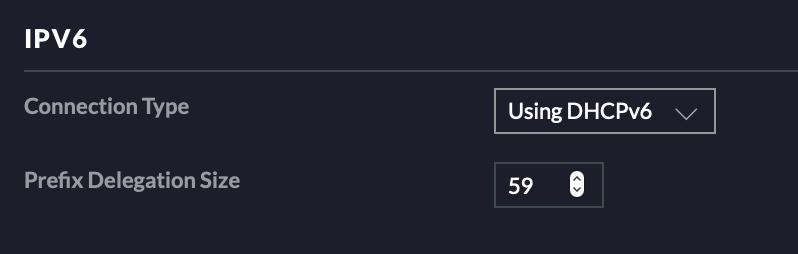\n\nSet your WAN interface **IPv6 Connection Type** to `Using DHCPv6`. You will need to ensure that your cable modem has DHCPv6 enabled, it usually is by default. The **Prefix Delegation Size** should be set to `59` as 56 didn't seem to work.\n\n\n### LAN Interface\n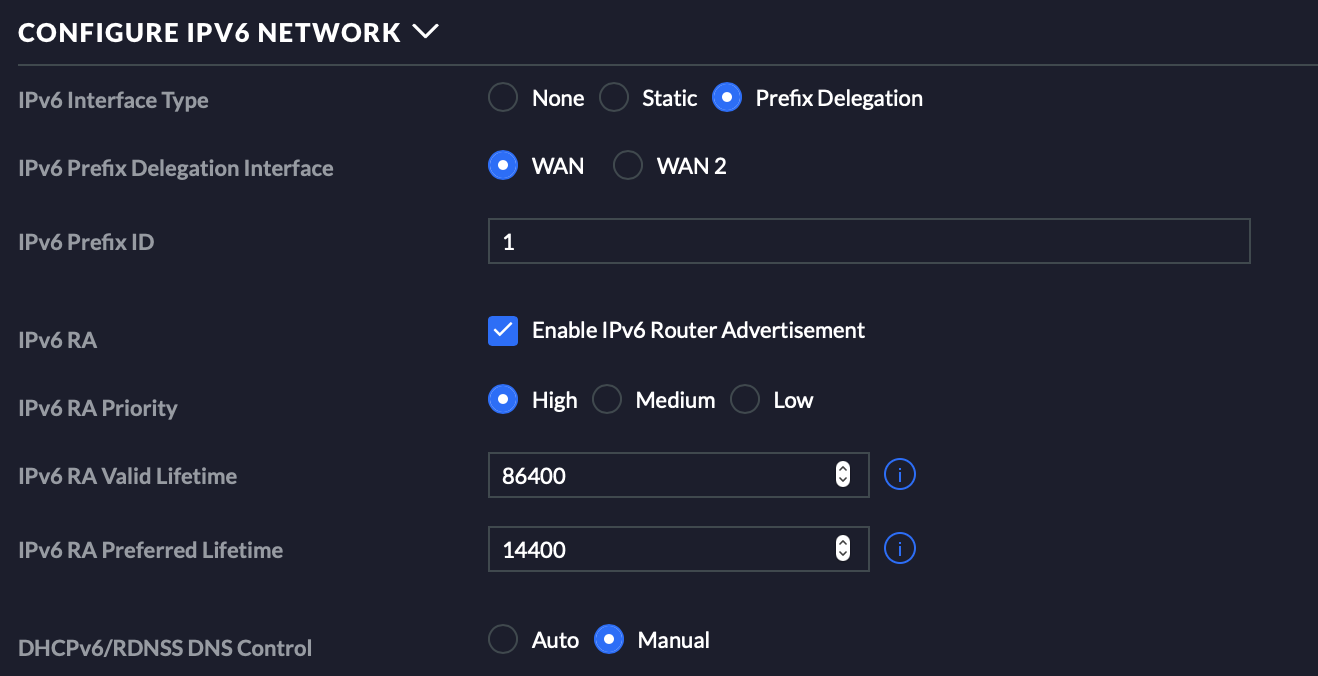\n\n**IPv6 Interface Type** gets set to `Prefix Delegation`, you select the WAN interface you used earlier, and you set the **IPv6 Prefix ID** to `1`. \n\nI suggest setting **DHCPv6/RDNSS DNS Control** to `Auto`, mine is set to `Manual` due to having a [Pi-hole](https://pi-hole.net) on my network that I use for DNS recursion/caching.\n\n\n### The Backend Stuff\nYou will need to follow the **USG Advanced Configuration** guide found here: https://help.ubnt.com/hc/en-us/articles/215458888-UniFi-USG-Advanced-Configuration.\n\nFollowing that guide you create your own `config.gateway.json` file and can paste the following.\n```\n{\n \"interfaces\": {\n \"ethernet\": {\n \"eth2\": {\n \"dhcpv6-pd\": {\n \"rapid-commit\": \"disable\"\n }\n }\n }\n }\n}\n```\nIf you are using **WAN2** instead of **WAN** change `eth2` to `eth3`. \n\n### Finishing Up\nIf you followed the guide and **Force provision**ed your **USG** you should be good to go. \nMy linux hosts picked up the IPv6 IPs automatically, and on my Apple products I just disabled then re-enabled Wifi.","html":"\u003cp\u003eIf you are reading this it is likely you were like me, on the edge of giving up on IPv6 on your network. After combining a few small pieces from posts outlining \u003cstrong\u003eComcast Business IPv6\u003c/strong\u003e using Ubiquiti EdgeRouters along with the \u003ca href=\"https://help.ubnt.com/hc/en-us/articles/215458888-UniFi-USG-Advanced-Configuration\" rel=\"nofollow\"\u003e\u003cstrong\u003eUSG Advanced Configuration\u003c/strong\u003e\u003c/a\u003e guide I was able to get something that not only works correctly, but persists correctly also.\u003c/p\u003e\n\u003cp\u003eThe trick was getting the right settings defined in the web interface and the one setting not available in the web interface. It\u0026#39;s pretty straight forward, so for sake of simplicity I will just tell you what things need to be set. \u003cem\u003eThis configuration has 1 of my internal networks having IPv6, I did not want to spend any more time trying to make this work across multiple internal networks, but it probably isn\u0026#39;t hard.\u003c/em\u003e\u003c/p\u003e\n\u003ch4\u003eWAN Interface\u003c/h4\u003e\n\u003cimg src=\"/content/images/2019/11/Screen-Shot-2019-11-05-at-7-49-35-AM.png\" alt=\"\"\u003e\n\u003cp\u003eSet your WAN interface \u003cstrong\u003eIPv6 Connection Type\u003c/strong\u003e to \u003ccode\u003eUsing DHCPv6\u003c/code\u003e. You will need to ensure that your cable modem has DHCPv6 enabled, it usually is by default. The \u003cstrong\u003ePrefix Delegation Size\u003c/strong\u003e should be set to \u003ccode\u003e59\u003c/code\u003e as 56 didn\u0026#39;t seem to work.\u003c/p\u003e\n\u003ch3\u003eLAN Interface\u003c/h3\u003e\n\u003cimg src=\"/content/images/2019/11/Screen-Shot-2019-11-05-at-7-52-39-AM.png\" alt=\"\"\u003e\n\u003cp\u003e\u003cstrong\u003eIPv6 Interface Type\u003c/strong\u003e gets set to \u003ccode\u003ePrefix Delegation\u003c/code\u003e, you select the WAN interface you used earlier, and you set the \u003cstrong\u003eIPv6 Prefix ID\u003c/strong\u003e to \u003ccode\u003e1\u003c/code\u003e.\u003c/p\u003e\n\u003cp\u003eI suggest setting \u003cstrong\u003eDHCPv6/RDNSS DNS Control\u003c/strong\u003e to \u003ccode\u003eAuto\u003c/code\u003e, mine is set to \u003ccode\u003eManual\u003c/code\u003e due to having a \u003ca href=\"https://pi-hole.net\" rel=\"nofollow\"\u003ePi-hole\u003c/a\u003e on my network that I use for DNS recursion/caching.\u003c/p\u003e\n\u003ch3\u003eThe Backend Stuff\u003c/h3\u003e\n\u003cp\u003eYou will need to follow the \u003cstrong\u003eUSG Advanced Configuration\u003c/strong\u003e guide found here: \u003ca href=\"https://help.ubnt.com/hc/en-us/articles/215458888-UniFi-USG-Advanced-Configuration\" rel=\"nofollow\"\u003ehttps://help.ubnt.com/hc/en-us/articles/215458888-UniFi-USG-Advanced-Configuration\u003c/a\u003e.\u003c/p\u003e\n\u003cp\u003eFollowing that guide you create your own \u003ccode\u003econfig.gateway.json\u003c/code\u003e file and can paste the following.\u003c/p\u003e\n\u003cpre\u003e\u003ccode\u003e{\n \u0026#34;interfaces\u0026#34;: {\n \u0026#34;ethernet\u0026#34;: {\n \u0026#34;eth2\u0026#34;: {\n \u0026#34;dhcpv6-pd\u0026#34;: {\n \u0026#34;rapid-commit\u0026#34;: \u0026#34;disable\u0026#34;\n }\n }\n }\n }\n}\n\u003c/code\u003e\u003c/pre\u003e\n\u003cp\u003eIf you are using \u003cstrong\u003eWAN2\u003c/strong\u003e instead of \u003cstrong\u003eWAN\u003c/strong\u003e change \u003ccode\u003eeth2\u003c/code\u003e to \u003ccode\u003eeth3\u003c/code\u003e.\u003c/p\u003e\n\u003ch3\u003eFinishing Up\u003c/h3\u003e\n\u003cp\u003eIf you followed the guide and \u003cstrong\u003eForce provision\u003c/strong\u003eed your \u003cstrong\u003eUSG\u003c/strong\u003e you should be good to go.\nMy linux hosts picked up the IPv6 IPs automatically, and on my Apple products I just disabled then re-enabled Wifi.\u003c/p\u003e\n","excerpt":"","metaTitle":"","metaDescription":"","status":"published","featured":false,"publishedAt":"2019-11-05T13:07:15Z","authorId":"190160de54f2192bd5b8734ec8808086","authorName":"Daniel Chote","authorSlug":"daniel","heroMediaId":"a89f927e3c656e9526008e3aee6a678d","projectId":"","tags":[{"id":"d35708b28e494df332afc857416da120","name":"Unifi","slug":"unifi"},{"id":"75282f5450b7d8d38ca5570b768f4816","name":"Ubiquiti","slug":"ubiquiti"},{"id":"ef5b5edfc8d3f826a59d61a4be854fd8","name":"Networking","slug":"networking"}],"createdAt":"2026-10-18T13:16:27Z","updatedAt":"2026-10-18T13:16:27Z"}],"site":{"id":"projectable","theme":"projectable","title":"Daniel Chote's Project Blog","description":"Software Development, Hardware Hacking, Sim Racing, Multirotors and Robots!","timezone":"America/New_York","postsPerPage":10,"logoMediaId":"21557257b3f2ecc4b3fa875b808097a7","coverMediaId":"25f1417193daeb2af73861aaa0dd17fd","copyright":"© Daniel Chote","twitterUrl":"https://twitter.com/dchote","linkedinUrl":"https://www.linkedin.com/in/dchote","googleTagId":"G-07GJBQVM38","hosts":[{"host":"new.projectable.me","canonical":false},{"host":"projectable.me","canonical":true},{"host":"www.projectable.me","canonical":false}]},"tag":{"name":"Ubiquiti","slug":"ubiquiti"},"tagId":"75282f5450b7d8d38ca5570b768f4816","total":1}